


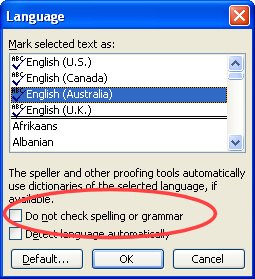
You know how it happens. You type something that is HTML or Javascript into a document or you type the famous “Lorem ipsum … ” text or a French phrase or two and suddenly your document is littered with red underlines. The Spell check can’t handle it all. Now I like my documents to be pristine and neat so I tell Word to bypass spell checking these words since I’m happy they are spelled just fine.
To do this, select the text you DON’T WANT to be spell checked. Choose Tools, Language, Set Language and click the Do not check spelling or grammar option and click Ok. Now Word spell checks all your document and just skips the stuff you don’t want checked.
I am inexperienced with MS Word. I have always used WordPerfect, which is immensely superior to Word. I recently bought a new computer, and I am forced to use Windows 7, which has made most of my old software obsolete. I am trying to spell check a Word 2010 document that is over 300 words long. The results I get say that it checked 2 words, 31 characters. Does this application work, or am I going to have to spend another $100+ to upgrade my WordPerfect to add to the $1000+ I have already spent replacing perfectly good software?
Check that you do not have any text selected before you run the spell checker. I think that what is happening is that you have some words selected when you are running the spellchecker and this means it only checks those words.
Thank you for the reply.
After reading your message, I opened the document, which is now over six pages long and tried a spell check. It has many graphics, stock market charts, but even so, has hundreds of words. Nothing was selected. A dialog box appeared with the message. “The spell check is complete, Words marked ‘Do not spell or grammar check were skipped'”. The result said it checked 6 words, 22 characters. I looked everywhere for a way to omit words from a spell check. I found nothing. I never marked anything as do not spell check; I do not know how. But then, all kinds of weird things happen with Windows 7, and Office 2010. I did misspell a word in typing this message and got a wiggly red underline, but it does not do that in my document.