


I’m sure you’ve had that “that was a dumb thing to do” feeling before. You do something that you thought was smart but ends up being very silly indeed.
I got that recently when I added someone to my Outlook Blocked senders list. Yikes! they were so not supposed to go there!
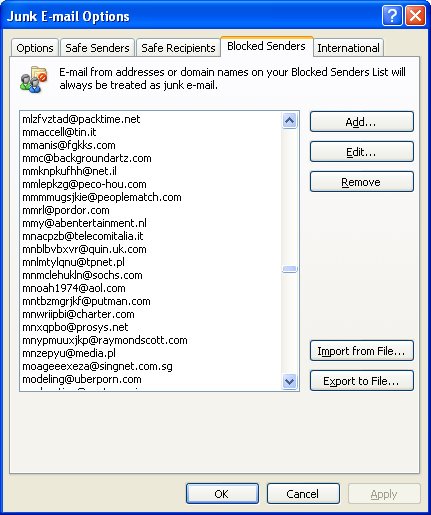
Luckily it’s fairly easy to undo the damage. In Outlook choose Tools > Options > Preferences tab and under the E-mail options click Junk E-mail. Click the Blocked Senders tab and locate the email address that shouldn’t be there and click Remove. Simple!
Now, if you need to go in reverse and add someone, here’s how (believe me, I’m astonishingly good at this step): In Outlook choose Tools > Options > Preferences tab and under the E-mail options click Junk E-mail. Click the Blocked Senders tab. This time click Add, type the email address or an entire domain name (but be sure you really want to do this!) and click Ok.
If you have an email from the person in your inbox there is an even easier solution. Right click the email, choose Junk E-mail > Add Sender to Blocked Senders List.
There you have it.. get someone onto the Blocked senders list and get them off again. Better still, it works in Outlook 2002, Outlook 2003 and Outlook 2007.
If I put someone on the blocked senders list, does the person receive an auto reply that the address has been blocked?
No! Wouldn’t that be horrible if it did? They don’t know anything and you never see their messages.
I put someone, a business, on the blocked sender list-several times-but I continue getting email from them. What gives?
This just happened to me and I googled the Outlook problem and found your post which described exactly how to fix it. 4 years later, you saved me a lot of hassle. Thanks.
Hi, I am having problems with my Blocked Senders list. Up until recently I had a very long list of blocked senders, and now any address i put in that list is virtually deleted straight away!! Should that be happenning?? I have Outlook Express Version 6.
Your help would be appreciated.
宅配買取サービス業界で著名なブランディアは、マイルームにいながらバッグを買い取ってくれるタダのサービスです。学生が申し込む理由のほとんどは買取価格が高いからです。
なりゆきの人生を送っている俺だ。必要以上の金は持たねー。なんてかっこつけてる場合ではないほど金がなくてどうしようもない。
しかし実行に移す力オンリーでここまで生きてきた。したがって、来月の仰天企画もどうにか成功させる。
金はレイクでキャッシングすることにした。けれども、審査で嘘くさいことを話すと審査落ちしそうなので、そこだけは偏屈な僕でも確実になった。
薔薇の花束を買う予定で借りる前は2万円も借りれればいいと考えていた。ところが嬉しい誤算で、限度額は何と20万円だった。ここは印象に残るように10万円以上のサプライズ品を買うしかないだろう。と僕の中の別人格がささやいた。
What’s up, every time i used to check website posts here early in the break of day, since i enjoy to gain knowledge of more and more.
Hello, I think your website might be having browser compatibility issues.
When I look at your blog in Opera, it looks fine but when opening
in Internet Explorer, it has some overlapping. I just wanted to
give you a quick heads up! Other then that, awesome blog!
Millones de gracias estoy comenzando mi proyecto de auto-sustentabilidad, tengo media hectarea y
esto me es sumamente util….los invito a que me visiten….
Profiling is to aid in solving a crime or finding the criminal.
If your business is already established and you are <. Working with Publisher, your imagination is the limit.
冤罪で極刑が決まった兄リンカーン・バローズを助け出すために、弟マイケル・スコフィールドがわざと刑務所に入り、一緒に脱獄をするストーリーです。しかし、脱獄した後の話がまた最高で、常時ハラハラさせられるので時間を忘れて観ていても飽きませんよ。
シーズン1~4までありますが、脱獄までを描くシーズン1、天才FBIのマホーンからの逃走を描いたシーズン2が傑作です。見どころは一つに絞れませんが、やはり役者の個性が際立ちます。そして、いきなり重要人物が死んだりするので、先が読めません。
特にセオドア、通称T-Bag。これはもう、役者さんが最高すぎます。おそらく彼が演じていなければ、ここまでインパクトのある登場人物にはならなかったはず。役柄は子供数人をレイプ殺人したという最悪な凶悪犯ですが、どこか憎めず、シーズン1からシーズン4の最終話まで最後まで出番のある数少ない一人です。
バイクを高く売るならこちら。
Très, très bon article, merci