

Articles | Photoshop and Photography blog | about me |e-mail

ProjectWoman

Welcome to Helen Bradley's Microsoft Office and productivity blog. I'm a lifestyle journalist specializing in business and consumer software and here you'll find handy hints for using software such as Microsoft Office 2007 and other office applications. Elsewhere on projectwoman.com you'll find tutorials, articles, how tos and tips on photography and Photoshop CS3. My publishing credits include PC Magazine, Windows XP magazine, CNet, PC User magazine, InformIT and others.

Thursday, October 11, 2007

Set Outlook as your default email program


It's handy to be able to click an email address on a web page and have your email software launch automatically with a new message ready for you to type. It's a nuisance if you do this and the wrong email software opens.

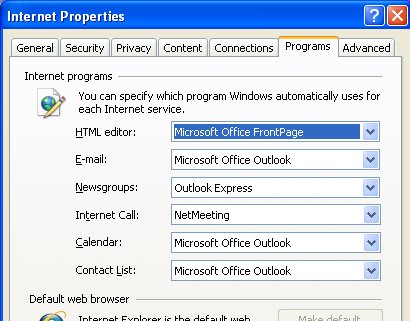
It is, however, quite easy to set any email software to be the default program to use in these circumstances. To do this, choose Start, Control Panel, and then click Internet Options. Click the Programs tab and, from the Email list, select the email program to use as the default. Click Ok and you're done.

Add to Technorati Favorites

0 Comments:

Post a Comment

Links to this post:

Create a Link

<< Home