


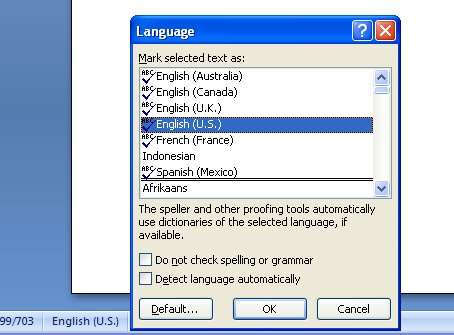
I write for magazines and online providers all across the world. One day, I’m typing a Canadian article, another an Australian one and later in the week my work gets sent off to the UK and the USA. I’m constantly juggling color/colour, labor/labour and tricky ones like jewelry/jewellery. It’s confusing to say the least and the last thing I want to do is to miss obvious misspellings. That’s why I rely on Word’s language tools.
Prior to Word 2007 I can set the language for a document by selecting it and choose Tools, Language, Set Language and choose the proofing language.
In Word 2007, of course, everything is different but it’s easy to find – thank you Microsoft!
In Word 2007, select your document (Control + A works just fine) and click the language indicator on the Status bar – the Language dialog appears and you can choose the language to use to proof the text.
Post a Comment
Please feel free to add your comment here. Thank you!