


In olders versions of Word, you could enter random text into a document using something like this typed in at the beginning of a new line and press Enter:
=rand(2,3)
This gives you 2 paragraphs each of 3 sentences of the text “The quick brown fox jumped over the lazy dog.” It was not particularly original but it was handy for filler text.
In Word 2007, the news is better still. There are two options:
type
=rand(3)
To get three paragraphs of random text, this time it actaully makes sense and looks like real text.
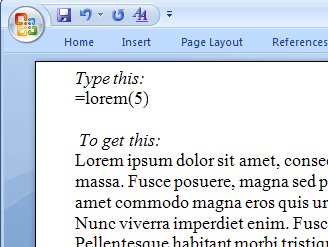
The best news is, however, that Lorem ipsum can be entered automatically. Now I can remove the AutoText entry I always use to insert this Latin text and do it anywhere, anytime in Word 2007. Here’s what you type:
=lorem()
this gives you a little sampler of text. Type:
=lorem(10)
to get 10 paragraphs of it.
It’s easy to remember and easy to use and, well – thank you Microsoft, I’m impressed!
Post a Comment
Please feel free to add your comment here. Thank you!