


Typeover mode got axed in Word 2007 – thousands upon thousands of users are celebrating the event – no more gobbled up words when you hit the Insert key by mistake. Some users, however, are crying into their morning coffee – if you used it and understood it, typeover mode was great – the keyword being “was”.
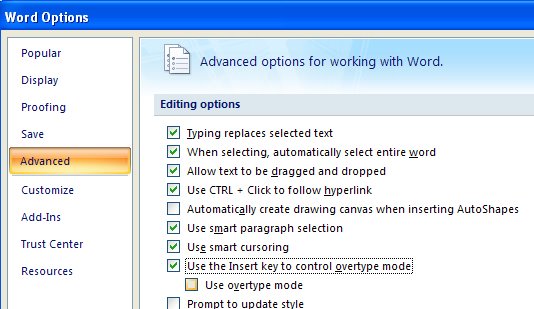
So, if you’re bemoaning the loss of Typeover, be glad you stopped by to sample today’s tip. Here’s the way to put typeover back where you wanted it to be. Click the Office button and choose Word Options. Click the Advanced group and scroll down to find the Use Insert the key to control overtype mode option and check it. To always start in Overtype mode check the Use overtype mode checkbox too. Click Ok and you’re done.
Now the Insert key performs like you expect it to, but don’t come complaining to me if Word eats your words, remember – you asked for it.
Oh wow this is great!! Thank you very much!!
Thank you so much, I missed my insert key terribly.
Fantastic! I'd been wondering where "it" had disappeared to – it's great to have it back, as part of my work involves editing text in Word & I started to get more than a little frustrated that I couldn't figure out how to get typeover mode back. Thanks for the tip!!
Thanks so much for the easy directions on changing the insert key back.
Got back from vacation and found Word 2007 on my computer … with no warning, hint or clues! As a copy editor, this info is more than a blessing!!
Thank you ! I am most grateful for this info. I rarely hit that key by mistake – it is located all the way up to the right, above the numeric keypad. I have always used ‘insert’ or ‘typeover’ anyway without too much headache.
Thanks for the tip. I’m using Word 2010, did they get rid of the indicator “Ins”/”Typ” that told you which mode you were in?
Many tnx. I used the insert/typeover in Word Perfect and it sure beats using the deleat key all the time.
Thank you, thank you. I don’t know how anyone in an office could function without this key. As a matter of fact, I don’t know how a student could write a paper without this function. Anyone that edit should be able to use this WONDERFUL feature. It’s a must. All the haters need to learn how to use their computer if they think that this function is a bad one.
People did not like it? So they liked typing and then deleting the extra spaces…that is what Office 07/10 brought us, more inefficiencies. Glad it is back and thanks for showing me how to re-instate it.
Sorry, it didn’t work. Any tips?
Thank you!! My co-worker and I agree that you are our favorite person of the week!! LOL
And I can’t imagine people hating this function. It’s much more convenient than having to constantly remove my hands from the keyboard to use the mouse to highlight names and information within a document that I want to change.
And you are my favourite reader of the week! thank you for the kind comments..
THANK YOU!!!!! Yes, I realize I shouting; I am so happy to find this tip.
Thank you! We are switching from Word Perfect to Word and so far it is VERY frustrating.
My work involves a lot of cut/copy-paste-edit. This tip will surely make my job a lot easier. Many thanks!
But no where do I see a symbol denoting that you are in typeover mode like it used to be in Office 2003!