


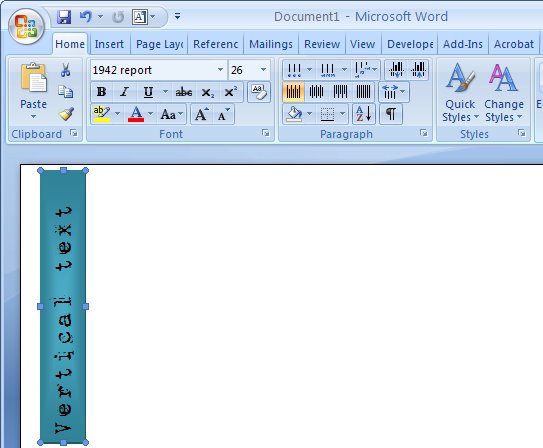
I love the look of page headings that appear down the side of the page – vertical text mixed with regular text just looks so cool.
Here’s how to create rotated text or vertical text on a page in Word 2007:
Start by creating a text box so choose Insert > Text Box and select either a text box style from the list (not the best idea), or click Draw Text Box to draw your own (much better).
Type your text in the text box then click Text Box Tools > Format and locate the Text Direction button. Click it to rotate the text to the desired orientation. Now simply size the text box to the desired size and move into position and apply one of Word’s new text box styles and you’re done. Simple and fun.
After trying all of the solutions describe, I can honestly say the "SmartArt" option is the easiest, quickest and most efficient. Thank you for your excellent suggestion.
Try this:
Click: Start
Select: Run
Type: Winword (This opens a nice clean session of Word)
Now follow the instructions at the tip top of this page.
When you are done copy and paste your text box into whatever document you are trying to edit.
I was working in an .htm file when I couldn't solve the text rotation problem. I'm running Word 2007 with SP2. Everything works fine if you are in a .doc or .docx file.
All,
I think the issue may be the user's and not MS. In work 2007, you are using the wrong "Rotate". The Rotate is for the shape which is what it does.
Try this.
Insert a Text Box (normal text box not a rec shape). Type your Text.
Now with the Text box object selected, Click on the "FORMAT" menu. One of the sub menues says Text… an option in that is Text Direction.
Suprise!
Go to typeupsidedown.com and type away copy and paste…so simple remember ɯoɔ˙uʍopǝpısdnǝdʎʇ
could you explain the same with Microsoft Word 2003
I think you misunderstood Bill and anonymous – I am fairly certain that the people looking for help don't want to change the direction of their text, but the directions of the entire box- not just at 90 degree increments. So your suggestion was not what we are really looking for.
Some aspects of shape behavior are different betwen Word 2007 and Excel 2007. Try making various drawing objects in one application, then copy and paste into the other.
One noteable difference is the right triangle: In Word 2007, the text never flips; it stays in the upright position regardless of containing object's transformation. The right triangle in Excel 2007, however, does change text orientation according to the rotation of the object.
Thanks for the help. The instructions for Word 2007 worked like a charm!
There is another alternative…
…try using Open Office. OK, the interface isn't as smooth as Word 2003, but it does work and you can rotate to any angle you want and then edit the textbox as many times as you need to.
Use PowerPoint 2007 – when you create a text box in there, it adds the green rotate dot.
This suggestion worked best for me; it was relatively easy and fast to employ. In contrast, I could not get the smartart option to work. Thanks for the help!
how can i write verticle text in word 2007???
my email id is – mohsinkhan.pnd@gmail.com
MS Help was no help – your site gave me the answer in 30 seconds. It’s appreciated!
Hi fellas….That’s all r about text direction….How come if i wanna doing to rotate the text box…In office 2003 it can but in word 2007 it’s doesn’t seem can………Please show me friends….
THANK YOU…
Thanks! could not figure out how to do this in word 2007!
@Neo I think the problem is that your text box is created “in line with text” so it won’t rotate. First right click the text box and choose Format Textbox (or Format Shape) and go to the Layout tab and alter the wrapping to something other than “in line with text” so Square or In front of text are good options. Then the shape will rotate just fine when you drag on its green handle.
in single box i need one word in vertical and another in horizontal how can i draw it
Use two text boxes one with each type of rotated text. Turn the borders and fill off on each of them and then place them over the top of each other to get your effect.
Thanks for your comments, everyone. The PowerPoint option worked best for me. I tried the text box options, but still couldn’t rotate the shape in Word 2007.
Hey Daz, thanks.. power point works best for me..
Fantastic! Thank you
DARN IT!@!@!@!
I can’t get the writing verticle please I need an answer ergently 4 homework
HEYYY
thank youuuuuuu sooo much,
been trying for agees !!!
First working suggestionn!(8
your website is the besttxxx(seriously :P)
Thanks for the help, I had forgot how to do this.
Thanks, this was quick and easy
So badly explain in the first place, because of the lack of punctuation among other things
Insert-Shapes-draw it- right click -Add text-Format shape- sub menu Text Box- sub menu Text layout!Done!
“Rotated Text in Word 2007
Really nice post. Now its easy for me to rotate text easily, Thanks for sharing