


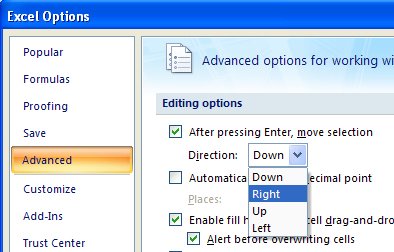
When I enter data across a row in Excel it is extremely annoying when the cell pointer moves down instead of across when I press the Enter key. Luckily I know how to make it work for me and in a couple or four steps, it’s doing what I want.
Click the Office Button, click Excel Options, Advanced and the first entry in the list is what you want. From the dropdown list select the movement option to use for the mouse and click Ok to end. Alternately disable the checkbox and the cell pointer won’t move at all.
It’s simple enough a process that you can change it whenever it suits you to do so.
Post a Comment
Please feel free to add your comment here. Thank you!