


You gotta love and hate Outlook. It’s like the little girl with the curl – when it’s good its very good and when it’s bad it’s awful.
Of course, one of the biggest problems with Outlook is it’s “go slow” behaviour. Part of the problem is that it stores everything in a single .PST file – and I mean everything that really matters like your emails, attachments, contacts and appointments. If that’s not bad enough (read all your eggs are in one burgeoning basket), there’s an upper limit to the size this file can grow to before Outlook turns up its little toes and stops working. The upper file size limit is 2GB and while this sounds big, it’s not.
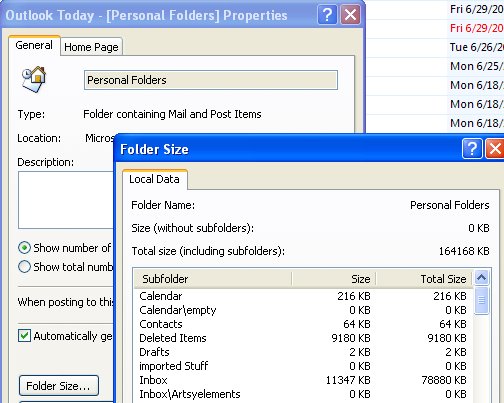
So, if Outlook is running slow, check your file size. Right click the Personal Folders link at the top of your Folders list, choose Properties for “Personal Folders” and click the Folder Size button. Wait as Outlook calculates the folder size. The closer it is to the magical 2GB limit, the more trouble you’re in.
The solution is to delete old and unwanted emails and to archive others to get it down to size.
Of course all this stupidity makes you hanker after a program that doesn’t store all the data in one place. Not unsurprisingly, most programs behave this way – Outlook is the exception to the rule.
Post a Comment
Please feel free to add your comment here. Thank you!