


If you’re using Office 2007 in a workgroup with others who are 2003 users, then you’ll encounter problems with them not being able to read your 2007 documents.
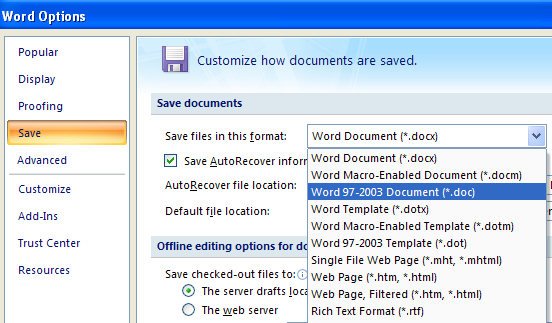
The simple solution is to change the default save format in the Office 2007 applications so they save automatically in the older formats. To do this, click the Office button and choose the Word Options button (for example), and click the Save option. In the dropdown list, Configure the Save files in this format option to the 97-2003 format.
You’ll need to do this separately for each application you want to change the default save format for.
Of course, this doesn’t stop you from saving in the new format or any other supported format. It just ensures that the default save format is backwardly compatible with other users.
Post a Comment
Please feel free to add your comment here. Thank you!