

Articles | Photoshop and Photography blog | about me |e-mail

ProjectWoman

Welcome to Helen Bradley's Microsoft Office and productivity blog. I'm a lifestyle journalist specializing in business and consumer software and here you'll find handy hints for using software such as Microsoft Office 2007 and other office applications. Elsewhere on projectwoman.com you'll find tutorials, articles, how tos and tips on photography and Photoshop CS3. My publishing credits include PC Magazine, Windows XP magazine, CNet, PC User magazine, InformIT and others.

Thursday, May 24, 2007

Showing the Styles pane in Word 2007


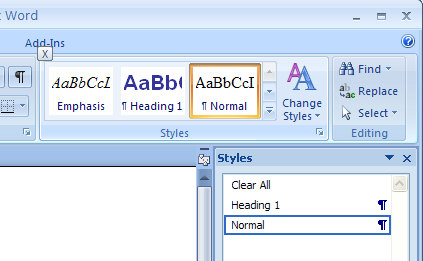
The Styles task pane in Word is a handy way of tracking what styles are applied to a paragraph and for formatting text with styles. You might be wondering if the Styles task pane is totally missing it in Word 2007. Don't worry - it is still there, you just have to find it.

Click the Home tab and locate the Styles group. Click the indicator in the bottom right corner to open the Styles dialog - voila! just what you need. To dock it so it sits permanently on the right of the screen, double click its title bar. You can also display it by pressing Control + Alt + Shift + S.

Labels: ,

Add to Technorati Favorites

0 Comments:

Post a Comment

Links to this post:

Create a Link

<< Home