


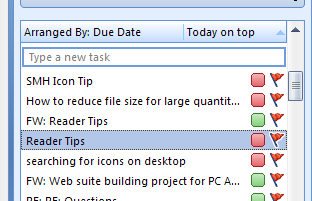
I often get emails that need attention such as a tip that a reader sends in for an column I write in the Sydney Morning Herald that I like and plan to use in an upcoming column – just not now. I flag it by right clicking and choose Follow Up and then a flag, like this week, next week, no date etc..
Having done that, the item appears automatically in my Outlook 2007 to do list so, provided the To do bar is showing, it’s there and I can check the items and find the tip whenever I need it. Combine follow up with color categories and you’re set. When you’re done with an item, right click it in the To Do bar and mark it as complete and it disappears.
Seriously, the To Do bar has the ability at last to be some use in Outlook 2007 so it’s time to begin using some behaviors that will make it work for you.
Post a Comment
Please feel free to add your comment here. Thank you!