


Hi Jim from Calgary!
Jim wrote and asked, “I’ve been using the camera icon for years and I can’t find it in Excel 2007. Can you see it anywhere?”
He also said, “nice blog thanks” – so anyone that nice deserves an answer.
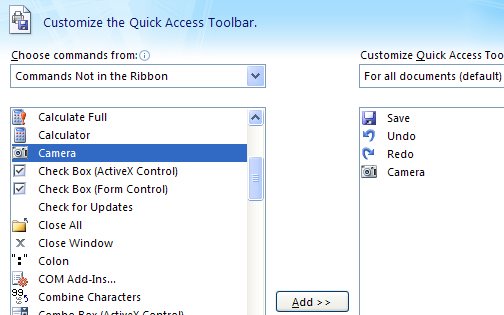
So, Jim, don’t go looking for the camera on the Ribbon it isn’t there. You probably already know you can’t customize the Ribbon either so you can’t put it just anywhere you like – thanks Microsoft! You’re limited to the Quick Access toolbar – that little bar to the right of the Office button. Click the down arrow to its immediate right and choose More Commands. From the Choose Commands From list choose ‘Commands Not in the Ribbon’ (that’s how I figure it probably isn’t on the ribbon), and then locate the Camera. Click it and click Add. Then click Ok. Now the camera is on the Quick Access Toolbar and it works as it always used to – least so far as I can see.
If you’ve now got a great new camera icon on your toolbar but you don’t know what to do with it, then visit my Snap an Excel range blog entry to find out…
thank you mom… i found this link through google …
Thanks, it’s amazing what information is on the web! Camera now located, why do MS make it so difficult?
Very useful tip!
You just saved me a lot of frustration. Thank you!
Thank you – extremely helpful!!!!
thank so much, it’s very hard to find this icon.
Thanks I was looking for this option since long time.
Thanks for your guidance it is very helpful for me
Hi:
I cannot get my camera function (through the camera icon). Any suggestions for activating it. I can move the icon to the short menu but it is lame. Any advice is welcome.
Lovely! Thanks for this, i’ve looking like crazy for this!
What to Look For in the Best Security Systems for Home