


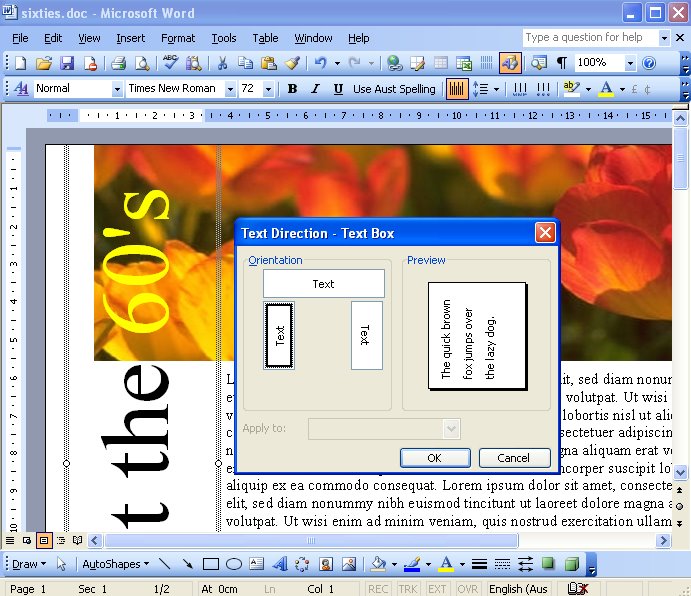
Ever been confused about how to create vertical text in Word. You deserve to be. There is this neat looking Text Direction tool that never seems to be active so you can use it. Fact is – it works on text in a table, but what if you don’t have text in a table?
Luckily it works just great on text in a text box. So, to make a vertical block of text, drag a text box (Insert, Text box) onto your page. Now click inside it and type your text. Click in the box and choose Format, Text Direction and choose one of the two vertical options – Voila! instant vertical text.
This is a very helpful tip. Microsoft Word’s help feature was not very forthcoming on this topic, but as usual, when you need the help, the help feature is is seldom that,…helpful.
Really, really helpful. Thanks
its really helped, thanks…
Luckily, luckily… DOES NOT WORK!
In FORMAT I haven´t found TEXT DIRECTION and I really use v. 2007
In Word 2007, first draw a Text Box using Insert > Text Box > Draw Text Box. Click inside the Text Box and you will have the Text Box > Format tab on the Ribbon. Click it – the Text Direction option is in the top left corner.
Helen
Thanks for the tip! Very helpful!
Thanks! How odd that MS didn’t make this a option in the ‘Format Text Box’ popup.
but does it also print the box? i just want vertical text with no box.
thanks,
b
is ok, i figured it out.
tx
If you remove the borders from the box – then the box is there but it won’t be seen.. you have to have the box to hold the text but you don’t have to make it visible.
Does this help?
When I go through the procedure you describe and rotate all text 90 degrees, all that happens is that the words (three in my case) are “stacked” on top of each other so that you read them in vertical fashion. How do I get the three words to display as shown on your colorful display above?
Have you tried to change the shape of the box. It might need to be taller and thinner
I have tried ever imaginable shape I can think of. If it’s tall and thin, some words get fragmented and become meaninless.
Helen, I finally figured it out. It’s all the the shape of the box. Thanks for your help.
Hello Helen,
I am trying to make a flyer to advertise French lessons, so I typed my contact numbers in eight cells. However, I can’t seem to find the Text Direction option to rotate the text. I have Windows 7. Any suggestions?
In Word 2007 & 2010 & 2013 click in the table cell, choose Table Tools > Design tab > Layout and the Text Direction button is in the Alignment group of options.
cheers
Helen