


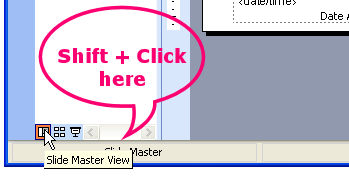
If you’re like me and you use the PowerPoint master view a lot—and you really should because it allows you to control the formatting of all the slides in your presentation from one place—you will know that there’s no quick way to open into master view.
That is unless you read this tip.
To quickly access the slide master view hold Shift and click the Slide View button in the bottom left corner of the PowerPoint screen. This automatically opens master view allowing you to work on the slide master then close it and return to your PowerPoint presentation. Simple, when you know how?
Post a Comment
Please feel free to add your comment here. Thank you!