


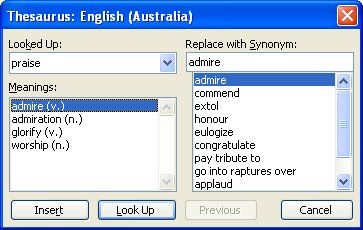
I hate it when Microsoft replaces things I like with tools I don’t like. Of course, one man’s (or should that be woman’s) meat is another’s poison so some folks out there probably like the new thesaurus pane in Word, I dislike it a lot. It just seems to be a lot of effort for precious little result – it practically never provides anything even remotely useful for me.
So, if you’re like me and you like the old Thesaurus in Word more than the task pane version you can still use it. Add it to a toolbar by right clicking a toolbar and choose Customize, Commands tab and, from the Categories list choose Tools. In the Commands list are two Thesaurus entries, you need the first of these. Drag and drop it onto a toolbar and click Close.
To test it, select a word and click the new button and your old Thesaurus dialog will appear. Much nicer in my book.
I guess I should be thankful Microsoft hasn’t made it impossible to customize toolbars – oops – I spoke too soon, in Word 2007 it did just that!
Post a Comment
Please feel free to add your comment here. Thank you!