

Articles | Photoshop and Photography blog | about me |e-mail

ProjectWoman

Welcome to Helen Bradley's Microsoft Office and productivity blog. I'm a lifestyle journalist specializing in business and consumer software and here you'll find handy hints for using software such as Microsoft Office 2007 and other office applications. Elsewhere on projectwoman.com you'll find tutorials, articles, how tos and tips on photography and Photoshop CS3. My publishing credits include PC Magazine, Windows XP magazine, CNet, PC User magazine, InformIT and others.

Tuesday, March 27, 2007

Excel and the taskbar


I like to see each individual worksheet I have open named on the taskbar - well, that is unless I don't. When I have one of those "redecorating the desktop" days, I opt to have one indicator for Excel and then use the Windows menu or Control + F6 to switch between them.

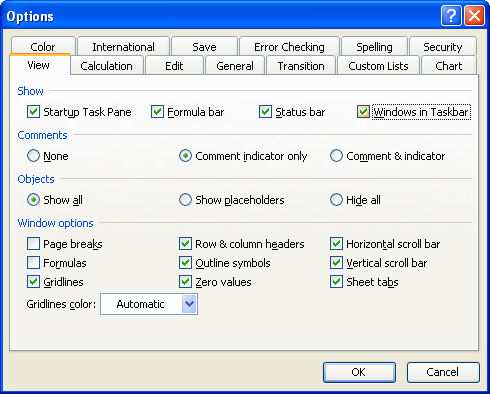
Changing how I view my Excel interface is easy. Choose Tools, Options and click the View tab in the Options dialog. Disable the Windows in Taskbar checkbox to view one Excel indicator on the taskbar. Click Ok. Reverse the process to switch back.


Labels: , ,

Add to Technorati Favorites

Links to this post:

Create a Link

<< Home