


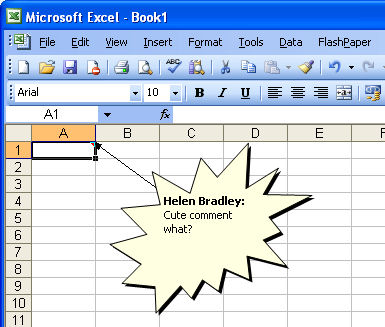
I like to use comments in my Excel worksheets but sometimes the square yellow boxes just don’t do it for me.
Luckily with a little bit of imagination and skill, I can change the shape of my comment boxes.
Here’s how to do it yourself:
Add a comment to your worksheet and click the cell that contains the comment, right-click and choose Edit Comment and then click on the border of the comment so you have it selected.
Now, from the Drawing toolbar click the Draw button and choose the Change AutoShape option in the menu. You can select from all sorts of shapes including stars and banners and flowchart symbols.
When you’re done just click outside the comment and the change will be created for you. Neat stuff? I think so.
Post a Comment
Please feel free to add your comment here. Thank you!